Beyond the Spreadsheet: Computer Tools for Formulation Development

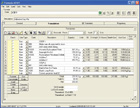
A FORMULATOR screen shot.
The Problem
Many laboratories develop and manage custom spreadsheets for tasks such as formula development, costing, small production operations, and inventory tracking. Spreadsheets provide the end user with valuable calculation tools that fill short-term needs but, over time, present numerous issues, including the following.- Poor to nonexistent security.
- Extremely difficult auditing.
- Changes are not logged.
- Crash recovery is only as good as the most recent backup.
- Difficulties searching for specific formulas or raw materials meeting certain requirements.
- Analysis is fixed; changes require re-programming the spreadsheet(s).
- No intermediate formula analysis is available without extensive programming.
- Cost updates are problematic, and are often difficult to apply at the intermediate level.
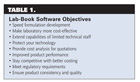
Table 1.
The Solution
To provide the basic functions required in a laboratory development or piloting environment, an application like FORMULATOR is required. FORMULATOR provides user management, auditing, search, analysis and a range of support, including the following features.- Security is set at user, group or module levels. Formulas can be divided into groups, and users can be restricted to no access or read-only access to these groups.
- Auditing is automatic, and revisions are user/date/time stamped.
- Data logging is electronic Lab-Book CFR 11 compliant.
- SQL Server/MySQL versions provide up-to-the-minute crash recovery.
- Raw materials and formulations can be searched for using a variety of conditions, with spot “where used” and full search-and-replace capabilities.
- Analysis tools are flexible and defined by user.
- Multi-level intermediate analysis is standard.
- Cost updates can be integrated off the shelf from ERP or accounting data, and then propagated to any number of levels in the database.
- Certificates of analysis.
- Electronic signature capture.
- Formula dilution/calculation adjustment and targeting.
- Test, QC, pilot, production batch, and related QC and adjustment histories.
- Project and time management, tying together all sampling, development, and testing.
- Properties, data elements and calculations are configurable by the user.
Research and Development Data
The first step in creating an Electronic Lab Book is to decide which database manager to use. In the past, spreadsheets were extended from and often tied to databases such as dBase or FoxPro. These older databases had their own security and scalability issues. Modern relational database-management systems are designed to work efficiently on most Microsoft Windows and Open Source servers (such as Linux), and are constantly evolving. When creating FORMULATOR, the ability to work with most leading-edge databases was a primary requirement. A common data interface now supports Microsoft Access, MSSQL Server, Sun Microsystems’ MySQL and Oracle, independent of the specific database-management system. The information and user functions onscreen are the same regardless of the database chosen.The extensible software-design approach provides a series of tools and utilities that allow for user-created criteria for data and mathematical functions. Rather than hard-coding the functions, the program allows the user to create their own units of measure (weight and volume), physical properties, equations, quality control functions, tests and testing criteria, hazardous materials criteria by CAS and EINECS number, repeated phrases, repeated manufacturing instructions, cost criteria, auto-numbering schema, inventory status, and conversions, and allows the user to add additional raw materials, formula, and hazardous-materials fields.
FORMULATOR relies on user-created raw materials, which are used within formulas. Formulas can then be used as raw materials within other formulas. The amount of any one raw material can be expanded and consolidated from the full formula for equation and regulatory purposes. Quality-control test requirements are tied to each formula singularly or as a series of tests. Regulatory criteria can be identified first by raw material then by formula.
Once a formula is ready, a test batch can be created with the amounts for each material, instructions and the QC tests to be run and recorded by formula by test batch. Users can add notes in most of the critical areas of the program. Most note areas provide basic formatting and font selection. Cut and paste from other documents is supported.
Using the Software
A logical layout and progression is important to the functionality of complex software. Even more helpful are linkages between modules and setup and configuration, with the availability of context-sensitive Help windows. FORMULATOR provides highly complex functions in a clear and straightforward fashion. Links between functions and setup screens make it easy to add and modify fields and functions. The program also allows the user to view and work with multiple compares - of various formulas, of the equation results for a series of formulas, and to look back on every change in a formula since it was first developed.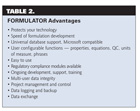
Table 2.
Program and Data Security
Spreadsheets have little security. A database-management system, however, provides security as well as scalability, backup and recovery, and auditing. Security on each table can be set by user or group, and can range from “Full Access” to “Read Only” to “No Access.”FORMULATOR also provides application-level security. Regardless of the database security levels, the software provides each user or group of users a set of security privileges for each module in the system, from “Administrator” to “Supervisor” to “Add/Update/Delete” to “Read Only” and “No Access.”
Each user or user group can also be prevented from viewing any cost data within the system. For many companies, the cost of materials and formulas is privileged information. FORMULATOR’s application security can set up certain users with no access to any cost information.
Security can also be set up by type of formula. This is desirable for companies with separate research groups and plant-support chemists. It allows research to use a common materials database, yet keep future development limited to those authorized to be working on them.
FORMULATOR also supports electronic signature capture for accounts requiring sign-off at critical points in the formulation, QC, or batching process.
Conclusion
Software like FORMULATOR that runs on a modern database platform can outperform spreadsheets in reliability of use, speed of formulation, collaborative development, security of technology and transfer to production. Cost analysis using database information ensures that quotations cover not only the current raw-material and container cost, but labor and overhead as well. The information gathered in a well-managed database will also ensure valid input for regulatory worker safety MSDS and hazardous label creation.For more information, phone (908) 735-2248 or e-mail jdegroff@formulatorus.com.
Looking for a reprint of this article?
From high-res PDFs to custom plaques, order your copy today!